


Raising Digital Citizens - Teaching Kids Online Safety and Digital Citizenship

Updated: May 10
This blog is a parent’s guide packed with clickable resources on online safety, gaming, social media, device controls, and practical tips to help you protect your child in the digital world.
In today’s connected world, raising kids means raising digital citizens. From the moment they can swipe a screen, children are stepping into a vast online environment filled with opportunities to learn, create, and connect, but also with risks that parents can’t ignore. The internet was never designed with children’s safety in mind, and without proper guidance, young users can stumble into harmful content, unsafe interactions, or situations that affect their well-being. By understanding the basics of online safety, recognizing potential risks, and staying engaged in your child’s digital life, you can help them build the skills and judgment they need to navigate the online world with confidence and care.

Let's Start With The Basics
The internet can be an incredible tool for learning, creativity, and connection, but it also presents real risks for children. This guide organizes trusted resources to help parents understand those risks and take action to keep kids safe online.
Links & Descriptions:
Check out this resource on the general idea behind online safety Nemours Kids Health
Notes:
The internet has many benefits and allows immediate access to all sorts of information and forms of communication
But with this has also raised some safety concerns, and therefore it is important to keep kids safe when they are using the internet
Parents should be aware of their child’s online activity and use various tools in order to protect their safety
Risks to be aware of Canadian Centre for Child Protection
Notes:
Children may be redirected to inappropriate content that is not moderated (i.e. explicit language, sexual content, violence)
Lack of privacy controls
Users may be following and viewing children from their end of the screen
Children can engage in online behaviour that may be recorded and misused
Online chat/messaging features
Children can be exposed to inappropriate conversations with other users
Why Online Safety Matters
Check on this link explaining why online safety can actually save children!
Notes:
Every half of a second, a child goes on the internet for the first time and will spend a significant portion of their lives in the digital environment
The internet was not designed with children’s safety in mind
Engaging online can result in negative impacts on a child’s physical and mental well-being
Notes:
Canadian children are preyed upon, exploited, and exposed to harmful content in the digital world
Meta, a popular social media platform company, estimates around 100,000 kids per day are sexually targeted across their platforms
Cybertip, Canada’s tipline for reporting sexual abuse and exploitation, has received about 7,000 reports from youth being sexually exploited mainly through Instagram and Snapchat
Children as young as the age of 6 are being coerced over livestream into sexual acts on insufficiently moderated platforms
Online Gaming Safety
Online gaming... something most parents know far too well. From the cheerful chime of notifications to the endless requests for “just one more level,” gaming is a huge part of many kids’ lives. While it can build problem-solving skills, creativity, and social connections, it also opens the door to risks like exposure to inappropriate content, in-game bullying, and contact from strangers. Knowing how to set boundaries, use parental controls, and have open conversations about healthy gaming habits is key to keeping it fun, and safe.
Check out the following sources on Online Gaming Safety:
Four steps for parents to encourage good game playing behaviour
How-to video tutorials: how to set parental control features on popular gaming consoles/platforms
Tips on how to add parental controls on various operating systems, browsers, search engines, video sites, games, game consoles and social media networks
Source: 6 tips for safe online gaming → (PDF infographic version)
Take an active interest in your child’s gaming
Discuss healthy behaviours
Utilize age-appropriate settings and tools
Dropdowns for specific settings for certain age groups with more details
Research age and content ratings
Agree on gaming boundaries
Develop your child's personal resilience

Age Minimums MATTER!
Age minimums on games, apps, and social media aren’t just suggestions, they’re there to help protect kids from content and interactions they may not be ready to handle. These guidelines are based on factors like the maturity needed to understand certain themes, the ability to navigate online interactions safely, and the presence of data collection. Allowing children to access platforms before they’re ready can expose them to risks such as harmful language, inappropriate material, and unsafe connections. Sticking to age recommendations helps set a solid foundation for safe and positive online experiences.
Links and Notes:
Age minimums for major platforms (e.g., TikTok, Instagram, Snapchat) (source: The Canadian Press News):
In 2000, Canada implemented “The Children’s Online Privacy Protection Act”, which prohibits kids under 13 to use platforms that are advertised to them without parental consent
Social media companies (TikTok, Instagram, Snapchat) ban kids under 13 from signing up for their services.
Why age minimums matter (source: Organisation for Economic Co-operation and Development (OECD) *non-canadian source).
A Canadian study found that 86% of children under 13 use at least one social media platform that prohibits users under 13.
Inability of social media platforms to verify the users age can lead to serious consequences.
Children can gain access to potentially harmful features such as direct messaging or livestreaming.
When creating an account, most platforms rely on self-declaration of age or only assure age in specific scenarios (e.g. suspicious activity or access to certain features).
However, children can essentially falsify their birthdates and gain access to content that may not be age-appropriate.
How to use parental controls and privacy settings - Check out these links provide for a comprehensive guide!
Privacy settings for Tik Tok (official platform website)
Privacy settings for Instagram (official platform website)
Privacy settings for SnapChat (official platform website)
Online Predators and Human Trafficking Awareness
Unfortunately, not everyone online has good intentions. Online predators can use games, social media, and chat apps to build trust with kids, often pretending to be someone their age. In some cases, these connections can be part of grooming, a process predators use to exploit or recruit youth, including for human trafficking. Many of these conversations start in seemingly innocent spaces like multiplayer game chats or direct messages. Talking openly with kids about the risks, teaching them to recognize red flags, and encouraging them to tell a trusted adult if something feels “off” can go a long way in keeping them safe.
How it works: Child Crime Prevention and Safety Center
Notes:
Adult predators will visit social media websites that are popular to younger audiences and will pretend to be their age
They might try to secure their trust with fake profile pictures, pretending to share similar interests, offering gifts to the child or complimenting them
A child may be pressured to take explicit photos or videos of themselves and send them to the groomer/predator
In some extreme cases, the groomer/predator might pressure the child into meeting in person and may even fly to meet the child
They might blackmail the child by threatening to release private photos or videos and share them with the child’s family/friends
Warning signs to be aware of:
Notes:
Online predators often order children not to talk about their conduct, making it difficult for parents to detect
If the child spends an increasing amount of time online
The child becomes secretive about their online usage
The child tends to switch screens or close tabs/windows whenever a parent is nearby
The child begins using sexual language that they would not be expected to know
The child becomes emotionally volatile
Things to look out for! Government of Canada
Notes:
The child has gifts that you didn’t get them
Seem more moody, troubled or secretive
Isolates themselves in a bedroom or bathroom
Have stomach aches, headaches or trouble sleeping
How to discuss this with your kids and build their trust Gov’t of Canada
Notes:
Have a serious conversation with your child about why online safety is important and discuss their rights
Explain they have the right to privacy and making their own choices about their body and sex
Share with them that you want to know if someone violates these rights so you can find ways to help them
Remind them of general online safety tips (e.g. keeping address, school, and phone number information private)
Some phrases that parents can utilize to navigate these conversations: Gov’t of Canada
Notes:
The website contains a breakdown of some phrases on how to set up the conversation, ask questions, follow up on the child's response to the question, discuss actions, and close the conversation
It specifically provides a breakdown for online safety, sexual images and videos, grooming, capping, sextortion, and cyberbullying
It also provides guidance for parents as they navigate their own emotions and next steps if they find out their child is a victim of online exploitation
Setting rules/boundaries Gov’t of Canada
Notes:
"It's important to me that you know what to do if you come across certain things online."
"It's OK to make friends on the internet. It's NOT OK for them, or anyone, to make you uncomfortable by talking about sex or sending sexual images and videos."
"It's OK for you to make friends online. It's NOT OK for those 'friends' to take screenshots or recordings of you without your permission."
"It's OK to be curious about sex and your sexuality. It's NOT OK to be pressured into sending sexual videos or pictures."
"I may not always agree with your choices, but I will always care about your safety. You can talk to me if you experience something upsetting or scary online. You'll never get in trouble for asking for help."
Prevention Strategies: 360 kids
Notes:
Have open and honest communication with your child by encouraging them to share their thoughts and concerns without fear of judgement and creating a safe space
Educate your child on the dangers of human trafficking, common tactics used by traffickers, and warning signs
Help them to develop the skills they need to protect themselves and make safe choices online
Monitor their online activity such as their online interactions, social media usage and gaming platforms
Teach them about online safety, privacy settings and the risks of sharing personal information with strangers
Build strong relationships with your child and stay involved in their lives, activities and friendships
Establish safety plans with your child so they know what to do if they feel uncomfortable, threatened or in danger
Teach your child to seek help, who to contact in emergencies, and how to identify safe places and trustworthy individuals
Additional Info: Parenting in the Online World (free booklet)
Information for parents regarding current trends and risks on online luring, sextortion, deepfakes, and online sexual violence
Pornography & Harmful Content
The internet makes it easy for children to accidentally or intentionally come across explicit or harmful material, including pornography, graphic violence, or content promoting dangerous behaviours. Early and repeated exposure can affect a child’s understanding of healthy relationships, consent, and body image. Parents can help by setting up filters, keeping devices in shared spaces, and having age-appropriate conversations about what’s real versus what’s staged or unsafe online. Encouraging kids to come to you if they see something disturbing helps them feel supported rather than shamed.
How to talk to kids and some common phrases that parents can say The Clay Centre for Young Healthy Minds
Notes:
Regardless of the approach, leave shame out of the discussion
Don’t mix shame with sexual curiosity to ensure that your child feels comfortable talking to you if something happens
If comfortable with the discussion, approach the issue before its an issue
Let your child know that there is particular content that they should not be viewing and say “If you come upon a site that feels inappropriate, please tell me.”
If your child finds their way into engaging with certain material, talk to them about it
You can say “That material is designed for adults and not for children. I’m sorry that it showed up on the computer, and we’ll work to block that and other sites like it. Do you have any questions?” and for younger kids it is ok to say that this is something you will discuss when they get older
If you notice signs of unhealthy internet use (e.g. skipping meals, staying up late, locking the door and unclear explanations for online behaviour) or evidence of visiting certain sites from their search history, you should talk to them
You can say “I’ve noticed that you’ve been spending a lot of private time on the internet, and it looks like from the history that you’ve visited some adult sites. I want to make sure you understand some important aspects of these sites, and the risks associated with this material.”
Phrases to use with your child Common Sense Media
Notes:
Website contains more detail and some phrases that parents can use when talking to their children
Aim to be open and not judge
It might feel awkward to talk about this (be lighthearted to make it more comfortable but try not to undermine the importance of what you are saying)
Accept that the conversation might be brief
Pick a conversation goal and prep your talking points
Stay focused on the positive
Restricting access to devices:
Google Family link (restrict access to certain sites)
Smartphone & Device Safety
Smartphones, tablets, and gaming devices give kids constant access to the online world, and the online world constant access to them. While these tools can be great for learning and connection, they also open the door to risks like cyberbullying, exposure to harmful content, location tracking, and overuse. Parents can help by setting up parental controls, teaching kids how to manage privacy settings, turning off location sharing unless necessary, and setting healthy screen time limits. Regular check-ins about who they’re talking to and what apps they’re using help keep communication open and reduce the chances of unsafe situations.
Check out the following links!
Safer Alternatives:
Gabb Technology Gabb
Technology designed with kids safety in mind
Products sold are phones and smart watches
Doesn't require parental controls because its kid safe → this means no access to social media or the internet
There is also smart messaging and GPS tracking
It’s considered the phone that keeps your kids connected rather than addicted
Recommended for ages 9-14
Comes with preloaded apps and 9 optional parent-enabled apps
There are a few different cellular plans that parents can choose from that offers unique features
Bark: Bark
Products sold are phones and watches
Bark sends alters for potential dangers and automatically monitors the child’s phone for concerning content
Parents can add or remove features on the phone to tailor it to their child
Can block and filter certain websites and content
24/7 GPS-powered location tracking
Settings for screen time and limits on particular apps
Allows parents to keep up with the evolving world of technology and the latest emojis, slangs and terms that might flag issues
Pinwheel: Pinwheel
Variety of different phone models for kids ages 8-18
Parents can log into the Caregiver Portal from their own device to manage and monitor their child’s Pinwheel
Parents can add more functions to the phone as their child gains more responsibility
Monitor call and text history
No social media, addictive games or ad-driven apps
GPS locator
Manage screen time by settings schedules
Pinwheel works with major Canadian carriers such as Bell, Rogers, and Telus
TickTalk Smartwatch My Tick Talk
Safe cellphone alternative for kids ages 3+
Certified by an FTC-approved Children’s Online Privacy Protection Act (COPPA) Safe Harbor program
There are a few different models with different features and pricing plans
Contains features such as parental control, activity tracker, location tracking, secure messaging, controlled access and more
No games, no social media, no internet
Comparison chart with pricing (located towards the end of the webpage-talks about the different features that each model has as well as the pricing)
Pros and cons of buying these safe devices for kids
AI Chatbots & Media Safety
Why It Matters
Growing use among kids and teens for answers and conversation.
Can be mistaken for a safe or trustworthy source.
Key Concerns
Spread of misinformation or harmful content.
Encourages oversharing of personal details.
Difficult for youth to recognize they’re speaking with AI, not a person.
Potential exposure to unsafe or age-inappropriate material.
Safety Reminders
Treat chatbots as unverified sources.
Never share personal information.
Encourage kids to check with a trusted adult.
InternetMatters.org provides a comprehensive guide for the most popular platforms used by kids and adults today, including up-to-date privacy settings and parental controls.

Just click on the app and download their ste-by-step guides.
Hidden Digital Risks in Unexpected Places
When we think about keeping kids safe online, our minds often go straight to social media, video-sharing sites, or gaming platforms. But the reality is, unsafe or explicit content can be found in places we may not immediately think of, even on platforms that seem “safe” or age-appropriate.
Spotify Search Bar – Even without explicit lyrics enabled, kids can find pornographic content by searching certain keywords. Some podcasts also contain inappropriate or sexual content and may have explicit cover images.
Pinterest – While it’s marketed as a creative idea-sharing platform, unfiltered searches can pull up sexualized or violent imagery, even in seemingly innocent categories.
Podcasts with Video – Some podcast platforms now allow video episodes, which can include explicit or graphic visuals.
Music Videos on Apple Music (or similar services) – Many music videos contain sexualized themes, violence, or adult imagery, even if the song itself seems harmless.
Instagram's NEW Teen Protection and How it Works
A few statistics to consider:
Reports have recently found that 1 in 3 boys between ages 9-12 experience online sexual interactions.
59% of young boys reported being bullied or made uncomfortable online.
2 in 3 kids who use youtube, instagram, facebook, and snapchat will have unwanted sexual experience online before they turn 18.
50 percent of the victims of online sexual exploitation are between the ages of 12 and 15.
Police data also show that a large majority of incidents of “luring” (i.e. communicating or trying to establish sexual relationships with minors online) involve youth 12-17.
The rate of online child sexual exploitation incidents (online sexual offences + child pornography) has risen steadily from 2014 to 2022. For example: 50 incidents per 100,000 children/youth in 2014, rising to ~160 per 100,000 in 2022.
Public Safety Canada notes heightened risk for Indigenous youth, LGBTQ2S+ youth, children with disabilities, or children in foster care.
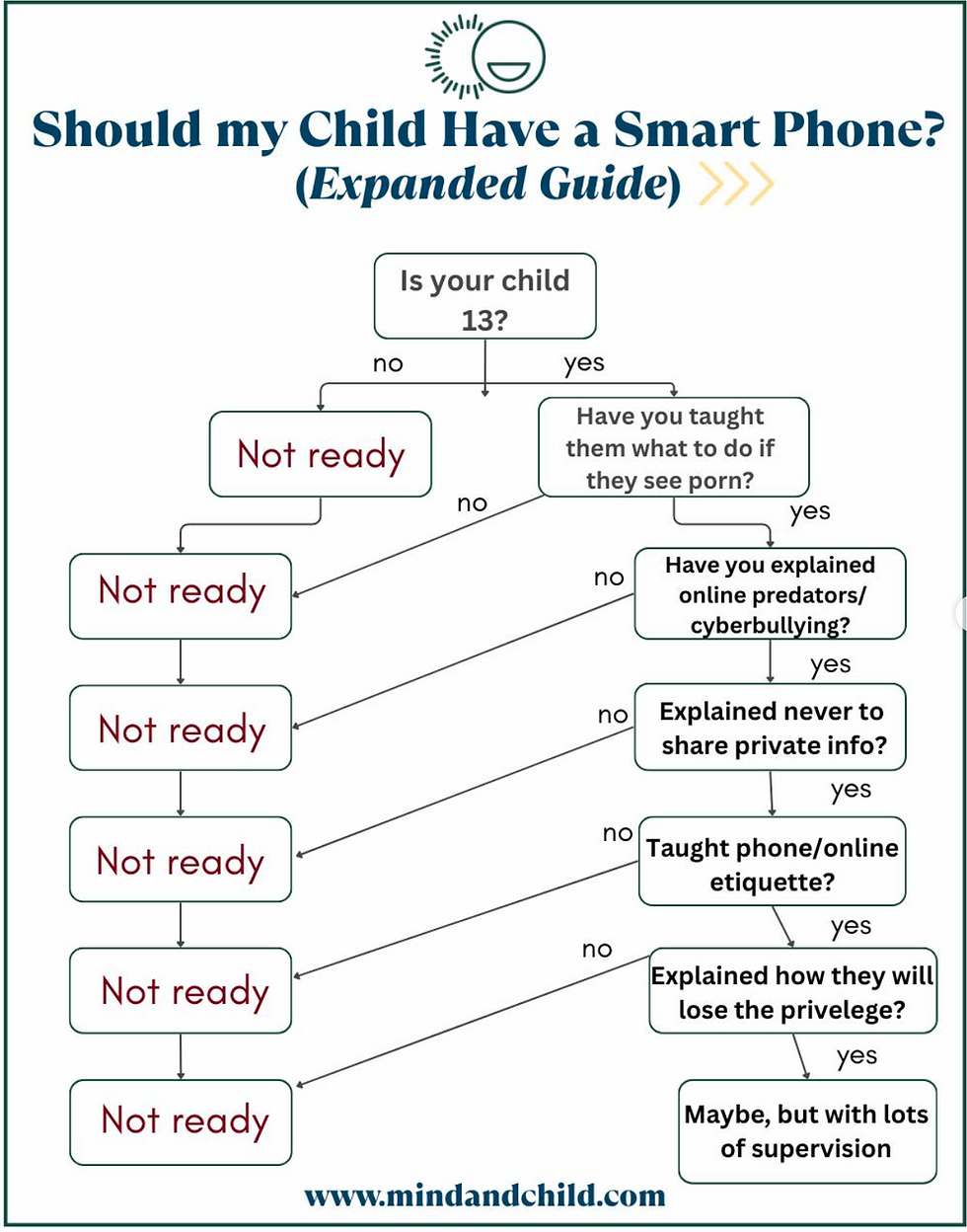
Not sure if your child is ready for a smartphone? Use this chart as a guide. It walks you through important questions, like age, online safety, and responsibility, that can help you decide if the timing is right. Remember: even if the answer is 'maybe,' supervision and ongoing conversations are key!
Where Your Child Where to Get Help
Parents or other family member
School staff
other trusted adult
Kids Help Phone (1800- 668-6868)
Project Arachnid
Apps to Watch Out For!

The takeaway? Digital safety isn’t just about “where” kids go online, but also about what’s hiding within the platforms they already use.
Helpful Parent Resources:
Social Media Accounts to Follow
Facebook: Officer Gomez,
Parenting in a Tech World
Instagram: @thegamereducator
Instagram: family_it_guy
Some Favourite Instagram Posts
Worth the Watch!
Watch Dr. Michelle and Dr. Stephanie’s insightful discussion on media safety and raising digital citizens. Click the link below to learn practical strategies for supporting children’s healthy digital habits.
We can help!
At WonderTree, we know that navigating online safety can feel overwhelming for parents, especially as technology evolves faster than most of us can keep up. Our team takes a proactive, strengths-based approach to helping families set clear boundaries, build digital literacy skills, and open healthy communication about the online world. Whether it’s creating family tech plans, offering parent workshops, or helping youth develop self-advocacy skills for safe online behavior, we’re here to make sure you don’t have to tackle it alone. Together, we can help your child enjoy the benefits of technology while staying safe and empowered.
Unsure where to start?

#emotionregulation #specialeducation #behaviour #coping #parentcoaching #advocacy #sensoryneeds #pornography #discussions #youth #sexeducation #safety #onlinesafety #adulting #children#onlinesafety#gaming#onlinerules#socialmedia#instagrapm#snapchat#tiktok#safe#keepkidssafe
IMPORTANT: Information shared by WonderTree is not intended to replace or be constituted as clinical or medical care. It’s intended for educational purposes only. Each child is unique, and the information provided may not be applicable to your specific situation. If you need support, please establish care with a licensed provider so that they can provide tailored recommendations for you or your child. This blog is non-monetized.


Comments